OCI Object Storage as File System

Since 2024 Storage Gateway is removed from oracle cloud infrastructure. However, there are other options mentioned to use buckets in OCI as file system. Detailed in this article.
Options
1) Access via OCIFs.
This is the most viable option to use the bucket as file-system, from the workload VM or server.
For this option, you’ll need to set up OCI config and API Key, configured somewhere , then use it for the tool.
- Install the OCI CLI.
# On RHEL-based OS ..
sudo dnf python36-oci-cli
# Or install the CLI for other OS (on-premise).
bash -c "$(curl -L https://raw.githubusercontent.com/oracle/oci-cli/master/scripts/install/install.sh)"
- Install the tool (OCIFS).
# Only available inside Oracle Linux.
sudo dnf ocifs
The tool is only readily available for Oracle Linux distro -at the time of writing-. It is part of a oracle’s hosted repository (ol9_oci_included). However, it is compatible with other RHEL-based distros. Contact the support to obtain it.
# use the package directly as RPM for other distors than OracleLinux.
#
dnf install fuse fuse-common fuse-libs jansson
rpm -ivh /tmp/ocifs-pkg/fuse-2.9.9-17.el9.aarch64.rpm
rpm -ivh /tmp/ocifs-pkg/ocifs-1.2.0-6.el9.aarch64.rpm
- Setup the service account’s config and API Key.
# Setup the config
mkdir ~/.oci/
cat << EOF > ~/.oci/config
[DEFAULT]
user=<OCID_ID_HERE>
fingerprint=<FINGERPRINT>
tenancy=<TENANT>
region=<REGION>
key_file=~/.oci/oci_api_key.pem
EOF
- Add the key in
~/.oci/oci_api_key.pem, and change placeholders with actual info.
# Setup API Key
vi ~/.oci/oci_api_key.pem
chmod 400 ~/.oci/oci_api_key.pem
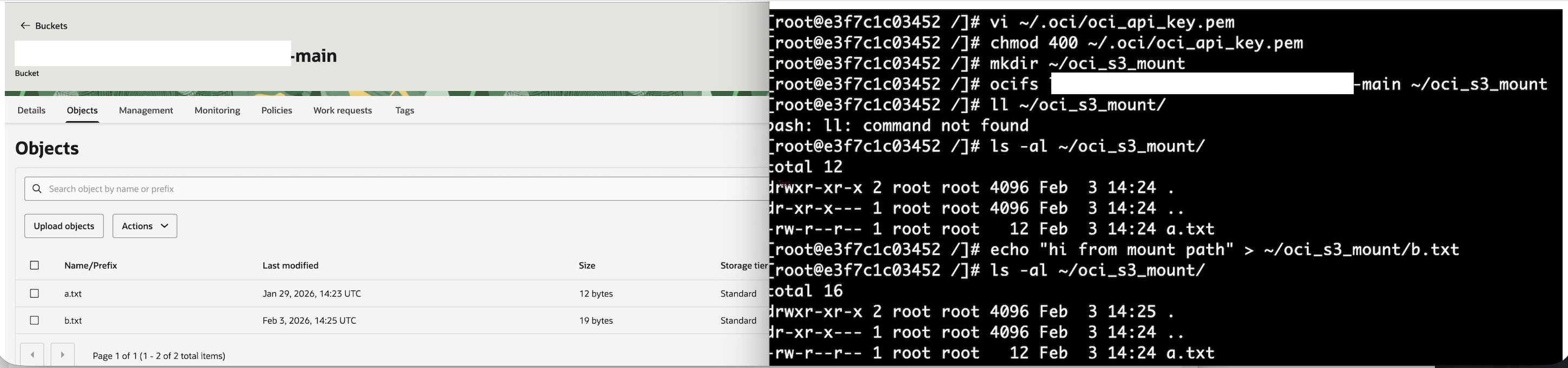
- Mount the bucket to a directory and use it.
mkdir ~/oci_s3_mount
ocifs my-bucket-main ~/oci_s3_mount
echo "hello world" >> ~/oci_s3_mount/b.txt
2.) Workaround: Access using S3 CLI.
Object storage is s3-compatible. It can be to read, write, sync to it using aws s3 CLI.
If using OCIFS tool is not feaisble for any reason, then S3 SDK CLI is sufficent for many cases, and helpful to address the requirement at hand. Below is a snippet for quick setup.
# add credentils.
export AWS_REGION="<REGION>"
export AWS_ACCESS_KEY_ID="<KEY_ID>"
export AWS_SECRET_ACCESS_KEY="<ACCESS_KEY>"

# install tools.
sudo dnf install python39-oci-cli
sudo dnf install awscli

# Use (test file) ..
aws aws s3api get-object --bucket="my-bucket-main" --endpoint-url="https://<OCI_NAMESPACE_HERE>.compat.objectstorage.<REGION>.oraclecloud.com" --key a.txt a.txt

# Or, use via private endpoint (requires OCI cli) ..
oci os object get --namespace "<OCI_NAMESPACE_HERE>" --bucket-name "my-bucket-main" --name "a.txt" --endpoint https://<PRIVATE_URL>.private.objectstorage.<REGION>.oci.customer-oci.com --file -
Replace